IT audit and IT health check
We quickly assess your IT: security, backup, Microsoft 365, servers, network and licences. You get a prioritised list of risks and an action plan – whether or not you work with us afterwards.
- Outcome
- Risk list and action plan
- Scope
- Security, backup, M365, servers, network
- When
- Before changes, after incidents, when switching
- Price
- By scope – proposal next business day
What we check
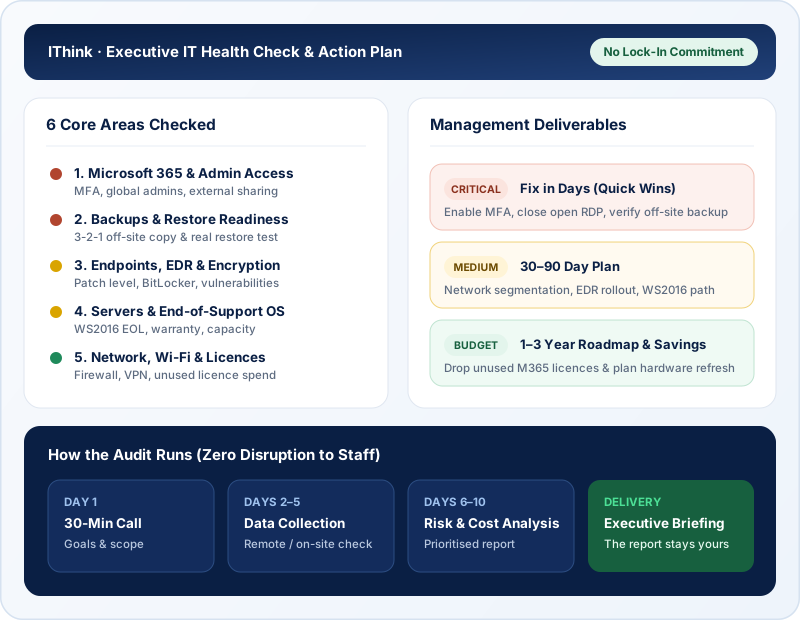
- Microsoft 365 security settings: MFA, access, sharing
- Endpoint protection, updates and vulnerabilities
- Backups: whether they exist, where they’re stored and whether they restore
- Server and OS health (e.g. Windows Server 2016 support status)
- Network, Wi-Fi and remote access
- Licences, IT assets and documentation
- …and more – not an exhaustive list; we tailor the service to your needs.
When an IT audit makes sense
Your IT person or provider changes
Someone leaves, or you switch provider.
After an incident
Malware, data loss or a breach.
Customers ask about security
For example NIS2 supplier questionnaires.
Before investing
Servers, migration or a new office.
How we work
Call
In 30 minutes we learn what matters most to you and which systems you use.
Data collection
Remotely, and on-site if needed, we check settings, devices and backups.
Analysis
We rate each risk by likelihood and business impact.
Presentation
We present the results to management and walk through the action plan.
What you get
A prioritised risk list
High, medium, low – explained in business language.
An action plan
Quick wins and longer work with indicative effort.
IT asset and licence review
What you have, what is ageing and what you pay for unnecessarily.
A management summary
A short overview to support decisions.
Indicative timeline
| Phase | Duration |
|---|---|
| Call and scope agreement | 1 business day |
| Data collection | 2–5 business days |
| Analysis and report | 3–5 business days |
| Results presentation | 1 meeting |
Durations are indicative – you get an exact plan and dates in the proposal, after we have assessed your environment.
What we need from you
To keep things moving, please have ready:
- a contact person and 30 minutes for the first call;
- temporary admin access to Microsoft 365, servers and network equipment;
- existing documentation and IT vendor contracts, if you have them;
- a list of your key business systems;
- information on past incidents or recurring problems.
A typical project: after the IT person left
The company’s only IT person left, no documentation remained, and management didn’t know who held admin access or whether the backups worked.
We ran an IT health check: collected access, reviewed Microsoft 365 settings, backups, servers and the network, and built an IT asset list.
Management got a clear risk list and action plan, and the most urgent work – MFA, a restore test and disabling unused accounts – was done in the first weeks.
A composite example based on our most common projects.
Frequently asked questions
Will the audit disrupt our work?
No. Most checks run remotely without interrupting your people.
Do we have to work with you afterwards?
No. The report and action plan are yours: implement them yourselves, with your IT person or with another provider.
How is an IT audit different from a NIS2 gap assessment?
An IT audit covers your whole IT – security, backup, hardware, licences and cost. A NIS2 gap assessment focuses on the directive and customer security requirements.
How much does an IT audit cost?
It depends on your company size and scope. You’ll get a proposal by the next business day.
Order an IT health check
Related services
Switching IT provider
Changing your IT support provider? We take over documentation, access and systems so your team barely notices. A clear written transition plan.
Learn moreNIS2
Help implementing NIS2 technical requirements: risk assessment, MFA, backup, incident handling and answers to supplier security questionnaires.
Learn moreManaged IT
Managed IT for companies in Lithuania: workstations, servers, network and Microsoft 365 with proactive monitoring, a custom SLA and a monthly report.
Learn more